MP3, AAC & Opus DirectShow Audio Playback
Version: 1.0.1.0 Included in: Lite, Standard and Plus; compensation in Plus.
Install through Media Player Codec Pack and select the component during setup. The integrated MPC Home Cinema player provides the recommended starting point. Other DirectShow players depend on their filter selection and output configuration.
Formats and purpose
| Format / use | Playback role |
|---|---|
| MP3 | MPEG Layer III audio. |
| AAC | AAC audio in supported standalone files and containers, including ADTS and M4A. |
| Opus | Opus audio in supported sources and containers. |
Container parsing, decoder selection and output support are separate parts of playback. See the pack’s complete format matrix for complementary LAV and player support.
Separate outputs for stereo and multichannel audio
CW-Lossy combines MP3, AAC and Opus playback with configurable audio output. It can use one device for stereo material and another for multichannel material.
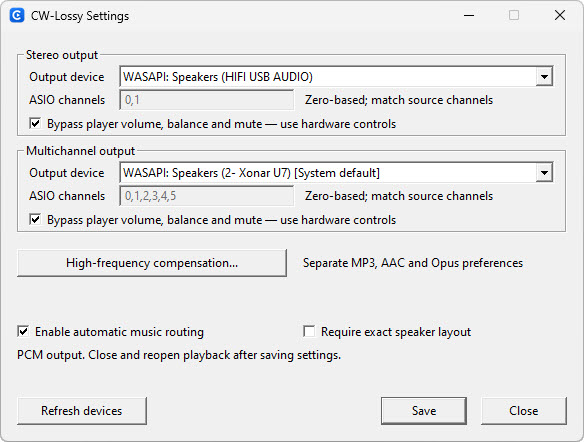
- Output device: choose the endpoint/driver for each output group.
- ASIO channels: zero-based channel assignments apply when an ASIO driver is selected. Match the source channels to the driver’s available outputs.
- Bypass player volume, balance and mute: uses the output path without those player controls. Use your hardware controls when bypass is enabled.
- Automatic music routing: enables the component’s routing behaviour using the configured outputs.
- Require exact speaker layout: use when the output must match the source layout.
CW-Lossy outputs decoded PCM. It does not make a lossy source lossless. After saving settings, close and reopen playback so the new preferences take effect.
High-frequency compensation — Plus edition
Plus includes optional compensation with independent settings for MP3, AAC and Opus. It adjusts treble that remains in the decoded signal. It does not recover frequencies or information removed by the encoder.
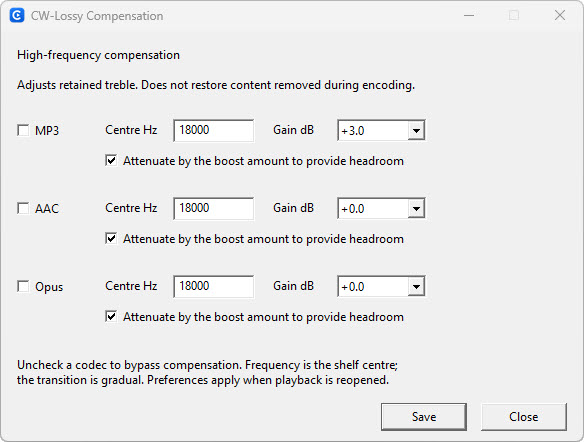
| Control | What it does |
|---|---|
| MP3 / AAC / Opus checkbox | Enables compensation separately for that codec. Uncheck it to bypass compensation. |
| Centre Hz | Sets the shelf centre frequency. The transition is gradual, rather than a sharp boundary. |
| Gain dB | Sets the amount of treble adjustment for that codec. |
| Attenuate by the boost amount to provide headroom | Reduces the signal level by the boost amount to provide headroom for the adjustment. A lower overall playback level is expected. |
The screenshot is an example, not a universal recommended EQ setting. Compare enabled and bypassed playback at comparable listening levels. Save and reopen playback to apply changes.
Common questions
Is high-frequency compensation available in Lite?
The CW-Lossy playback component is included in Lite, Standard and Plus. The optional compensation feature is supplied with Plus.
Does compensation restore the original recording?
No. It changes the balance of retained high frequencies. It cannot reconstruct the exact audio discarded during lossy encoding or make an MP3, AAC or Opus file lossless.
Why have the saved settings not changed playback?
Close and reopen playback, confirm that CW-Lossy is actually in the active filter chain, and check that the relevant codec’s compensation checkbox is enabled. Saved gain values alone do not enable compensation.