A free Windows codec solution focused on playback compatibility, intelligent setup, hardware-aware configuration, and updates that are worth installing.
✓ Free Windows codec pack for common and modern media files
✓ Hardware-aware setup with GPU, CPU and audio guidance
✓ Updates grouped around meaningful user-visible improvements
Free downloadWindows 11, 10, 8.1, 7Version 5.5.1Updated 20 October 2026
Hardware-aware video and GPU configuration
Built for practical Windows media playback
MediaPlayerCodecPack.com is the official website and download source for Media Player Codec Pack, published by Cole Williams Software Limited.
Media Player Codec Pack helps Windows users play more video and audio files without unnecessary trial and error. The project combines broad format support with setup guidance designed around the user's real CPU, GPU, audio hardware and codec limits.
Playback focusBDMV, EVO, HEVC / H.265, H.264, AV1, MKV, MP4, AVI, MOV, FLAC, AAC, AC3, DTS, OGG and more.
Best forUsers who want familiar Windows media players to handle more files with less setup confusion.
Development goalUseful releases, safer defaults, clearer options and hardware-aware configuration.
Media Player Codec Pack adds playback support for common video, audio, subtitle, container, playlist and compression formats used in downloaded media, camera clips, archived files, home-theater libraries and high-definition video.
The project is designed for users who want a clean, practical way to improve playback compatibility without manually searching for individual codecs, filters or splitters.
The goal is simple: reduce codec confusion, fix unsupported-format problems where possible, and help users choose settings that match their actual PC.
Easy setup with advanced control
Installer approach
Simple for most users, flexible for advanced users
Media Player Codec Pack is designed to be simple for most users while still giving advanced users control when they need it. The installer provides a recommended path for everyday setup and more detailed choices for users who want to review components, video options and audio output settings.
Transparency is part of the setup approach. Users should be able to see what is being installed, understand why settings are recommended, and avoid unnecessary guesswork.
Common problems it helps with
Videos that will not open.
Files that play with no sound.
Unsupported format and missing codec messages.
HEVC / H.265, AV1, MKV, MP4, MOV and AVI playback issues.
Setup links
Installation walkthroughs are kept separate from this reference page so setup instructions can stay specific to each build.
Media Player Codec Pack is more than a collection of playback components. A major part of the project is helping choose settings that make sense for the user's real system.
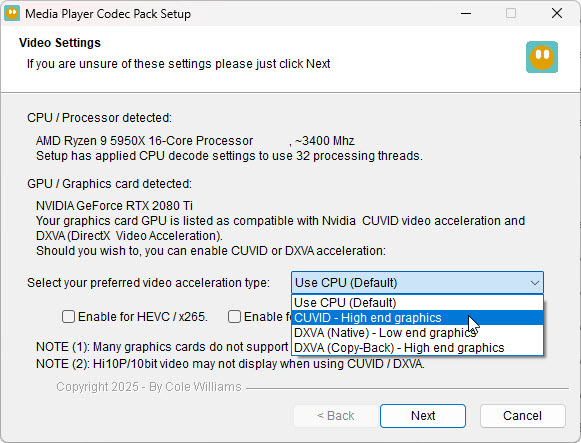
Earlier versions used an internal GPU database to recommend suitable hardware-decoding settings based on known graphics hardware. They also used the current Windows audio output configuration to recommend directly compatible speaker choices, including channel matching, downmixing or upmixing where appropriate.
Version 5.1.1 introduced actual GPU feature testing and audio hardware detection. This helps bridge the gap between what Windows reports, what the hardware can actually do, and what the installed codecs can safely use.
CPU and threads
Processor identification and thread detection help tune codecs to use an appropriate number of threads within codec limits.
GPU feature testing
GPU detection and feature testing help recommend hardware acceleration options for supported NVIDIA, AMD, ATI and Intel graphics hardware.
Audio hardware
Audio hardware detection helps guide users toward suitable output settings, including stereo, surround, analogue, digital and passthrough options.
Codec limits
Recommendations are intended to respect both the detected hardware and the practical limits of the installed codecs.
Meaningful updates, not update fatigue
Media Player Codec Pack follows a practical update philosophy: a new installer should be worthwhile for the person downloading it.
Updates are normally grouped around meaningful user-visible improvements rather than being released for every minor upstream edit, typo correction or internal component change. A good update should answer a simple question: what is better for the user?
New format support or improved playback reliability.
Better hardware detection, updated tools or safer installer behaviour.
Clearer options, improved audio handling, better defaults or fixes for common playback problems.
Tools and troubleshooting
The site includes focused playback-error guides and access to an online file inspector that can help identify the streams inside a media file. That is useful because file extensions such as .mp4, .mkv or .avi do not always reveal which codecs are inside the container.
Media Player Codec Pack continues a longer development lineage that began with the Cole2k Media Codec Packs. That history includes early public codec-pack releases, community testing, advanced playback and encoding support, and a long focus on practical Windows media problems.
Ongoing development also includes work on the LAME MP3 encoder, including performance, encoding-mode and Windows integration improvements maintained separately through the LAME MP3 project.
This page focuses on the current product, current editions and current development goals.
Frequently asked questions
What is Media Player Codec Pack?
Media Player Codec Pack is a free Windows codec solution designed to help users play more video and audio files in compatible media players.
Why does this About page mention hardware detection?
Hardware detection is a current development focus because playback settings depend on the real capabilities of the CPU, GPU, audio device, Windows configuration and installed codecs.
What changed in version 5.5.1?
Version 5.5.1 updates MPC Home Cinema to 2.8.3 and LAV Filters to 0.83, adds CW audio components, and introduces MPC FFmpeg and CW-PlayBridge in Plus.