Hi-Res Lossless Audio, DSD & HDCD DirectShow Playback
Version: 1.0.1.0 Included in: Lite, Standard and Plus.
Install through Media Player Codec Pack and select the component during setup. The integrated MPC Home Cinema player provides the recommended starting point. Other DirectShow players depend on their filter selection and output configuration.
Formats and purpose
| Format / use | Playback role |
|---|---|
| FLAC | Lossless stereo and multichannel audio. |
| ALAC | Apple Lossless audio, commonly stored in .m4a containers. |
| WavPack / WV | WavPack lossless audio files (.wv). |
| APE | Monkey’s Audio lossless files. |
| WAV / PCM | Uncompressed PCM audio and compatible HDCD-encoded material. |
| DXD | High-rate PCM audio, commonly stored in WAV containers; output depends on the selected device and driver. |
| DSF / DFF | DSD audio, including supported SACD/DSD playback workflows. |
| OFR | OptimFROG lossless audio. |
Container parsing, decoder selection and output support are separate parts of playback. See the pack’s complete format matrix for complementary LAV and player support.
High-resolution audio for an audiophile playback system
CW-Lossless is designed for listeners who want a short, direct playback path from lossless audio decoding to a configured WASAPI or ASIO output. It combines lossless music playback, high-rate PCM and DXD support, HDCD decoding, and native DSD or DoP output options within the pack’s DirectShow playback workflow.
High-resolution audio, often called Hi-Res audio, includes material such as 24-bit FLAC or WAV recordings at 96 kHz or 192 kHz. Lossless formats can also contain CD-resolution audio: a FLAC or WavPack extension alone does not establish the recording’s resolution. DXD is high-rate PCM, while DSD uses a different representation and has its own output requirements.
For an audiophile setup, the practical controls are the output device, supported source rate, channel routing and processing along the playback path. CW-Lossless provides a bit-perfect PCM option to bypass player volume, balance and mute, plus separate stereo and multichannel outputs. Check the selected driver, DAC capabilities and any other active processing when configuring playback.
The short design path gives you fewer playback stages to configure. The recording, settings and complete output chain determine the result; a higher sample rate or shorter path alone does not guarantee an audible improvement.
CW-Lossless settings explained
Open CW-Lossless Settings from the pack’s Codec Settings application. Stereo and multichannel material can use different output devices: for example, a dedicated stereo DAC for music and a surround soundcard for multichannel playback.
- Output device: choose a WASAPI endpoint or an available ASIO driver for each output group.
- ASIO channels: select zero-based driver channels. The examples use
0,1for stereo and0,1,2,3,4,5for six-channel output. Channel availability and ordering depend on the driver. - Bit-perfect PCM: bypasses player volume, balance and mute in this output path. It is not a guarantee that other processing elsewhere in the playback chain is disabled.
- Automatic music routing: enables the component’s music-routing behaviour using the configured outputs.
- Require exact speaker layout: requests a matching output layout; select it when exact layout matching is required by your setup.
- Decode HDCD to 24-bit PCM: enables HDCD decoding for compatible source material. Ordinary PCM does not become HDCD simply by enabling this option.
- SACD ISO area: selects the preferred stereo or multichannel area when using supported SACD ISO playback.
Use Refresh devices after connecting hardware, save your changes, then close and reopen playback.
Example 1: native DSD with the DacMagic 200M
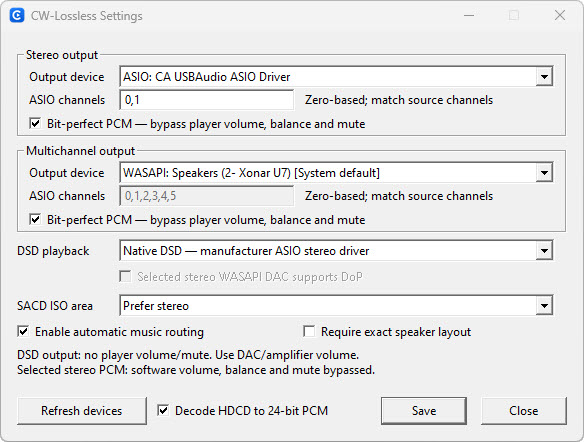
This example selects Native DSD — manufacturer ASIO stereo driver. Use the manufacturer’s compatible driver and a connection/input that supports native DSD. The DacMagic’s USB connection is the relevant native DSD path; its optical/coaxial capabilities are different.
Example 2: DoP through a WASAPI endpoint
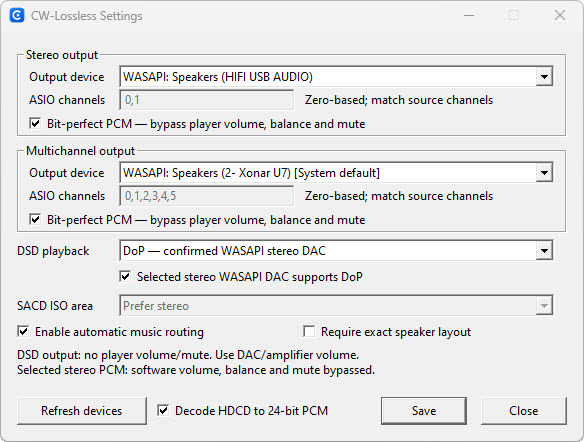
Select DoP — confirmed WASAPI stereo DAC only when the complete output chain supports it. With a USB-to-S/PDIF interface, both the interface and the receiving DAC/input must pass the required stream correctly. The generic Windows endpoint name does not confirm that capability.
Native DSD, DoP and S/PDIF
A DAC supporting DSD over USB does not automatically support DSD over optical or coaxial S/PDIF. Native DSD is not the standard S/PDIF transport mode. In a typical Windows native-DSD setup, CW-Lossless uses the DAC manufacturer’s ASIO driver over USB.
DoP (DSD over PCM) packages DSD data inside PCM-compatible frames without converting the audio into PCM samples. Some DAC inputs accept it; others accept PCM only. A PCM sample-rate specification alone does not prove DoP support.
CW-Lossless uses WASAPI for its DoP output mode. That is a requirement of this implementation, not a claim that DoP as a technology can only work through WASAPI. The stream must remain unaltered: volume processing, resampling or other DSP can prevent DoP recognition.
| Mode | CW-Lossless output choice | What to confirm |
|---|---|---|
| Native DSD | Manufacturer ASIO stereo driver | Driver and selected physical input support native DSD |
| DoP | Confirmed WASAPI stereo endpoint | Interface, connection and DAC input support the selected DoP rate with an unaltered stream |
| PCM playback | Compatible PCM output path | Supported PCM rate and layout; this does not constitute native DSD output |
For a concrete hardware example, Cambridge Audio lists native DSD on USB and DoP64 on the DacMagic 200M’s optical/coaxial inputs. Always check the specifications for the actual input being used. DacMagic 200M manufacturer manual.
For DSD output, use the DAC or amplifier’s volume control. The settings dialog explicitly notes that player volume and mute do not control that DSD output path.
Common questions
Why is LAV Audio loaded instead of CW-Lossless?
A registered filter is not necessarily selected by every player. Check MPC Home Cinema’s loaded filters and the CW configuration. Your chosen device/driver and fallback path can also affect the active playback chain.
Can I use these filters in Windows Media Player?
Only playback paths that use compatible DirectShow filters can select them. Windows Media Foundation playback paths do not automatically use DirectShow filters. Start with the pack’s configured MPC Home Cinema player.
Why does my DSD file play but the DAC does not indicate DSD?
The active path may be decoding to PCM rather than transporting DSD. Check the loaded filters, selected DSD mode, output device and input-specific DAC capabilities. File playback alone does not establish native DSD or DoP delivery.