Why encode multichannel audio as AC-3?
A video can contain a perfectly good 5.1-channel soundtrack yet play only in stereo when sent to an older home-cinema receiver or a Dolby Digital gaming-headphone processor. The problem is often the connection, not the file: standard optical or coaxial S/PDIF typically transports only two-channel uncompressed PCM, while compatible Dolby Digital (AC-3) bitstreams can carry up to 5.1 channels.
The codec pack's AC-3 encode output option is intended to bridge that gap. It takes multichannel audio that has already been decoded to PCM, encodes it to AC-3, and makes it suitable for a compatible digital output path. The encoded AC-3 output is fixed at 448 kbps and limited to 5.1 channels for compatibility. This is similar in purpose to the well-known Dolby Digital Live feature previously offered with certain soundcards, but it is not presented as Dolby Digital Live or an officially licensed Dolby implementation.
Simple signal-flow diagram
Which files can benefit?
The important factor is whether the audio decoder produces more than two PCM channels, not the video file's extension. Examples include:
| Audio in a file | Examples | Why conversion may help |
|---|---|---|
| FLAC 5.1 | Lossless multichannel audio in MKV or FLAC files | Optical S/PDIF cannot carry 5.1 PCM, but the receiver may accept AC-3 5.1. |
| AAC 5.1 | Multichannel AAC in MP4, M4V or MKV video | Many older receivers and headphone decoders do not decode AAC directly over S/PDIF. |
| Vorbis / Opus | Multichannel Vorbis or Opus streams, including those in Ogg, WebM or MKV containers | Decode to PCM first, then encode as AC-3 for a compatible optical receiver. |
| Other PCM-decodable audio | PCM/WAV, ALAC, WavPack and other supported multichannel streams | The same bridge may work whenever the installed decoder exposes a usable channel layout. |
Ogg is a container, not a codec. The audio inside an .ogg or .oga file may be Vorbis, Opus, FLAC or another format. Likewise, MKV and MP4 can contain different audio encodings. Only genuinely multichannel content can provide native surround separation; stereo can be upmixed separately if the user deliberately enables that processing.
How the routing behaves in practice
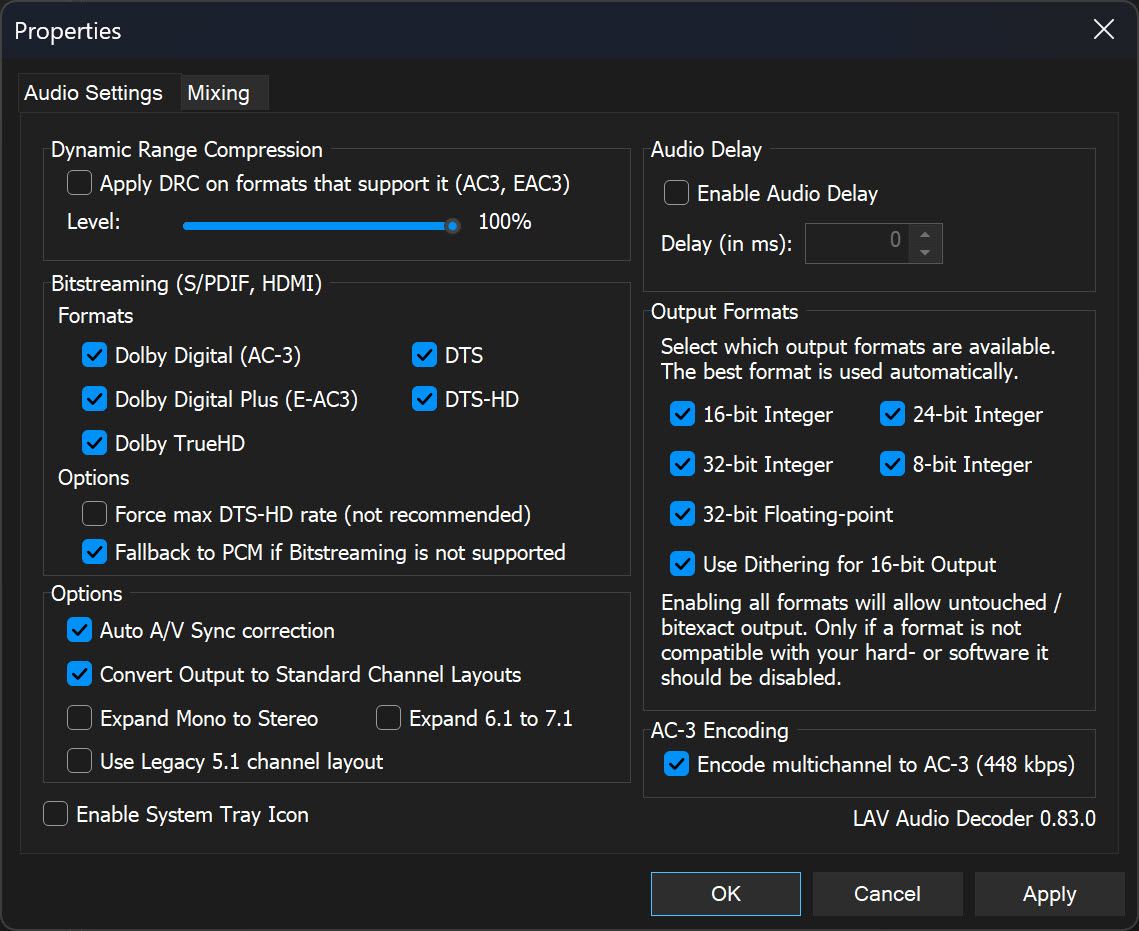
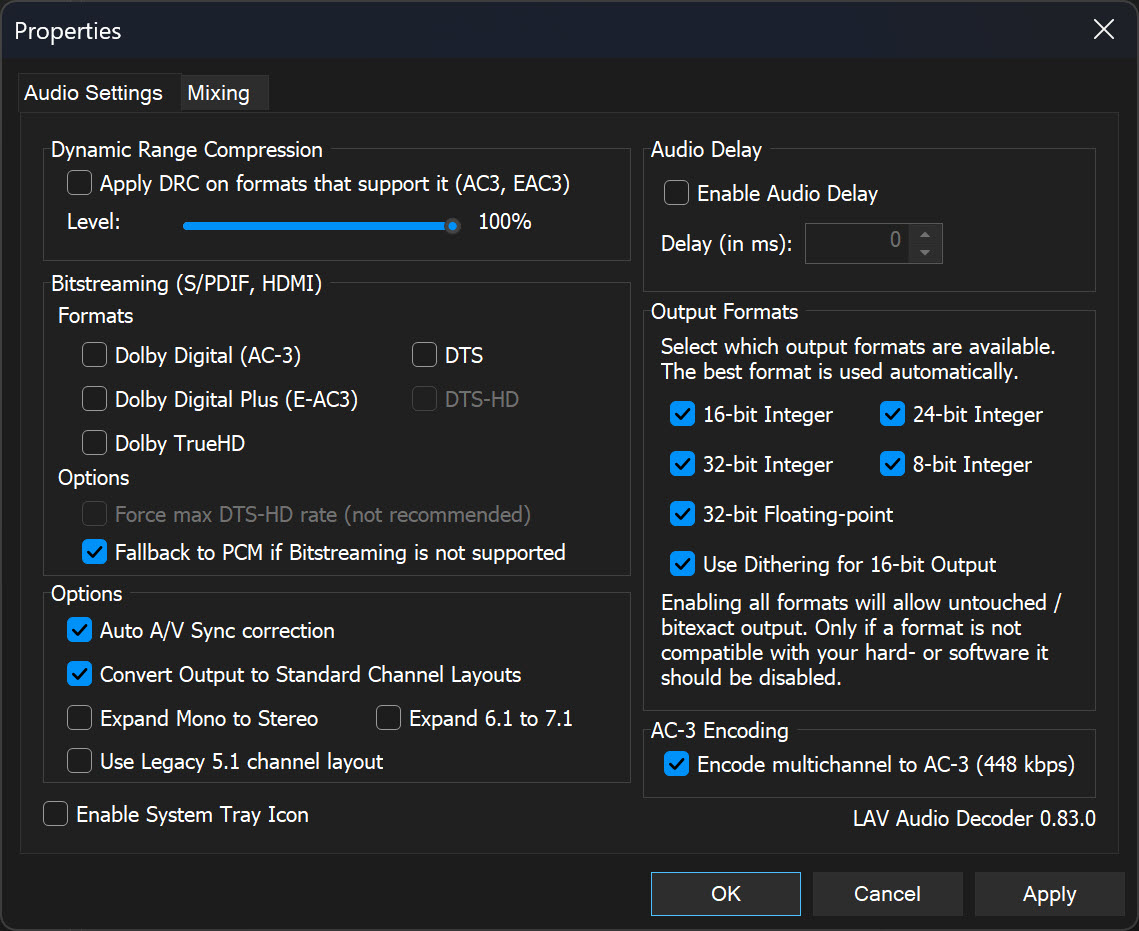
The AC-3 encoder is patched into the LAV Audio Decoder settings. It produces AC-3 at a fixed 448 kbps, supporting up to 5.1 output channels. Mono and stereo PCM remain PCM; 2.1–5.1 channel input retains its supported layout, while 6.1 and 7.1 input is automatically downmixed to 5.1 before encoding. The routing behaviour depends on whether direct bitstreaming is enabled for particular formats.
Why this is useful for home cinema and gaming headsets
Older AV receivers and surround processors
Some equipment accepts Dolby Digital 5.1 over optical or coaxial input but has no compatible route for receiving multichannel PCM. With supported hardware, AC-3 encode output lets a decoded 5.1 soundtrack reach that equipment as surround instead of being reduced to two-channel PCM.
Astro Gaming MixAmp and Xbox-era Dolby headphone adaptors
Several generations of Astro MixAmp and related Astro wireless transmitters accept Dolby Digital 5.1 on an optical input. They were commonly used with Xbox and PlayStation consoles to provide Dolby Headphone virtual surround. A PC running the patched LAV Audio Decoder can supply a compatible 448 kbps AC-3 signal over S/PDIF, subject to the PC output device and the selected MixAmp.
| Astro product family | Optical connection | What to check |
|---|---|---|
| MixAmp Pro Gen 1 and Gen 2 | 3.5 mm mini-TOSLINK optical input | Requires the appropriate mini-TOSLINK-to-TOSLINK cable or adapter. |
| MixAmp Pro TR Gen 3 and Gen 4 | Full-size TOSLINK optical input | Connect to PC optical output or a suitable HDMI-to-optical extractor. |
| Early A50 MixAmp TX / wireless transmitter generations | TOSLINK optical input | These are transmitter/base units rather than separate wired MixAmp Pro units; check exact generation and input labels. |
Using HDMI instead of a PC optical output: an HDMI audio extractor or compatible display optical passthrough can feed optical input on a MixAmp, provided it forwards Dolby Digital AC-3 rather than downmixing to stereo PCM. This is an HDMI-to-optical solution; these older MixAmps do not acquire a native HDMI input. Astro has documented an HDMI adapter for MixAmp Pro TR Gen 3/4 and selected A50 bases.
For reference, see the official Astro HDMI Adapter information and an archived original MixAmp instruction manual. Availability and connector support vary by generation.
Turtle Beach Ear Force DSS and DSS2
The Turtle Beach Ear Force DSS and Ear Force DSS2 are also suitable examples of optical Dolby Digital headphone processors. Both accept a Dolby Digital surround bitstream through their optical S/PDIF input and process it for conventional stereo headphones. They are particularly useful when a film has multichannel FLAC, AAC, Vorbis or Opus audio that the decoder can convert to compatible AC-3 output.
| Headphone processor | Digital input | Output use |
|---|---|---|
| Turtle Beach Ear Force DSS | Optical S/PDIF, Dolby Digital | Headphone surround processing; can also process analog stereo separately. |
| Turtle Beach Ear Force DSS2 | Optical S/PDIF, Dolby Digital 5.1 | Virtual 5.1 surround for stereo headphones, with adjustable surround settings. |
Use the digital optical connection. The analog stereo inputs do not carry an AC-3 bitstream. If the source only provides HDMI, use an HDMI-to-optical extractor that passes AC-3 without converting it to stereo PCM. The DSS and DSS2 are legacy products, so check cabling and power requirements before use.
Reference: Ear Force DSS manual and Ear Force DSS2 manual.
Other equipment with optical Dolby Digital decoding
AC-3 output also helps several other surround headphone systems and digital speaker products. These are examples of receivers of an AC-3 signal, not AC-3 encoders. Always check the actual optical input and settings on your model.
| Device | Why it may be useful | Manufacturer reference |
|---|---|---|
| SteelSeries Siberia 800 | Its transmitter accepts Dolby Digital surround through optical input, providing surround processing for wireless headphones. | SteelSeries optical audio guidance |
| Sony MDR-DS6500 | The DP-RF6500 surround headphone processor provides optical input and Dolby Digital decoding. | Sony manuals |
| Creative Sound Blaster X7 | Decodes Dolby Digital via its optical input, with headphone and speaker output options. Dolby Digital decoding is not provided through its PC USB input. | Creative hardware details |
| Logitech Z906 | A 5.1 speaker system with optical and coaxial digital inputs and built-in Dolby Digital decoding. | Logitech digital audio setup |
For all devices, an HDMI-to-optical extractor must preserve Dolby Digital rather than downmixing to stereo PCM. A receiver supporting AC-3 is necessary but not sufficient; the PC's sound driver and playback renderer must also permit encoded S/PDIF output.
Configuration and limitations
- Confirm that the source has multichannel audio and the audio decoder is producing the intended PCM channel layout.
- In the patched LAV Audio Decoder audio settings, enable Encode multichannel to AC-3 (448 kbps).
- If your AV receiver or display chain can directly accept formats such as AC-3 or DTS over HDMI / DisplayPort, leave those bitstream options enabled. If you specifically want multichannel PCM-based formats bridged to optical S/PDIF, disable the direct bitstreaming formats that are not relevant to your setup.
- Choose a compatible optical or coaxial digital output device and confirm that its driver and receiver accept AC-3 bitstreams.
- Play a 5.1 test source and verify that the receiver reports Dolby Digital or AC-3 input and that all speaker channels are mapped correctly.
- If you hear only stereo or silence, check whether another mixer, playback renderer or Windows setting has downmixed the PCM or blocked encoded output.
Existing AC-3 sources may instead use direct bitstream passthrough where available. Other formats, such as DTS or Dolby TrueHD, should only be decoded and re-encoded if the selected playback path supports that workflow.
Frequently asked questions
What is AC-3 encoding for S/PDIF?
It encodes decoded PCM audio into a Dolby Digital (AC-3) bitstream suitable for compatible optical or coaxial S/PDIF output devices.
Which file formats benefit from AC-3 encoding?
Any compatible audio stream that the installed decoder can turn into multichannel PCM, including suitable AAC, FLAC, Vorbis, Opus, ALAC, WAV or WavPack material. Ogg is a container and not an audio codec itself.
Is this the same as Dolby Digital Live?
It provides a similar practical PCM-to-AC-3 compatibility function. Dolby Digital Live is a Dolby-branded licensed real-time encoder technology; this codec-pack feature should not be represented as Dolby Digital Live or Dolby certified.
What happens when bitstreaming is also enabled?
Formats selected for bitstream output, such as AC-3 or DTS, will normally be passed through unchanged via compatible HDMI, DisplayPort or digital outputs. Other multichannel formats that are decoded to PCM can still be encoded to AC-3 for S/PDIF output.
Why not send multichannel PCM over optical S/PDIF?
Conventional optical or coaxial S/PDIF generally carries two-channel PCM, while compatible compressed surround bitstreams such as AC-3 can carry up to 5.1 channels.
Will it work with an Astro Gaming MixAmp?
Compatible optical-input Astro MixAmp Pro Gen 1/2 and MixAmp Pro TR Gen 3/4 units accept Dolby Digital 5.1 bitstreams; older A50 MixAmp transmitters also offer optical input. Connection type and support depend on the model. HDMI-only sources may require an HDMI audio extractor that passes AC-3 to optical.
Does it work with Turtle Beach DSS and DSS2?
Yes. The original Turtle Beach Ear Force DSS and DSS2 accept Dolby Digital surround through their optical S/PDIF inputs and process it for stereo headphones. Use the optical digital input; the analog input does not carry a discrete AC-3 bitstream.
Can it convert 7.1 PCM to 7.1 Dolby Digital?
No. This compatibility encoder outputs AC-3 at 448 kbps with a maximum of 5.1 channels. This decoder automatically downmixes 6.1- and 7.1-channel PCM to 5.1 before encoding at 448 kbps.
Can I choose a higher bitrate than 448 kbps?
No. This patched LAV Audio Decoder feature uses a fixed 448 kbps AC-3 output bitrate for compatibility with older S/PDIF receivers and headphone processors.
Is audio quality unchanged after encoding?
No. AC-3 is lossy. Encoding decoded PCM to AC-3 introduces another compression step, intended here for compatibility with equipment that cannot receive the original multichannel PCM.